When you find a piece of code you don’t understand, the first question is simple: what does this code do? You might be looking at a Python script, a JavaScript function, or a project on GitHub. You don’t need to understand every programming concept before you can start figuring it out.
The easiest approach is to identify the programming language, look at the code’s purpose, follow its instructions, and check its expected output. An AI code explainer can also translate unfamiliar code into plain English, but you should verify its explanation before relying on it.
This guide shows you how to understand code step by step, use free AI code explainers, explore GitHub projects, and check whether an explanation is correct. You’ll also learn how to protect your information when using online tools.
Short Definition
Code is a set of instructions that tells a computer what to do. To understand it, identify the language, follow its logic, and check the expected output.
Practical Tech Tip
Start with a short, non-sensitive code snippet and ask for its purpose, each line’s role, and expected output. Compare the explanation with the actual code and official documentation before relying on it.
Quick Checklist: How to Understand What Code Does
Use this checklist when examining unfamiliar code.
- Identify the language: Check the filename and recognizable syntax.
- Find the purpose: Determine what the code is designed to accomplish.
- Follow the logic: Trace variables, functions, conditions, and inputs.
- Predict the output: Work out what result the code should produce.
- Verify the explanation: Compare it with the source code, official documentation, and suitable tests.
- Stay safe: Remove sensitive information before sharing code, and never run unfamiliar code blindly.
What Does This Code Do?
Code is a set of instructions that tells a computer how to perform a task. Depending on the programming language and environment, those instructions might calculate a number, display a webpage, process a file, or control an application’s behavior.
To understand what a piece of code does, start by looking for five basic elements:
- Variables: Names that hold values, such as a price or a user’s name.
- Functions: Reusable blocks of code that perform particular tasks.
- Conditions: Rules that determine which instructions should run.
- Inputs: Information the program receives, such as text entered by a user.
- Outputs: Results the program produces, such as a message, number, file, or webpage.
Not every snippet contains all five elements. A short calculation might only use variables and an output statement, while a large application may rely on hundreds of functions and external libraries.
Context also matters. A single function might appear to perform a simple task, but its behavior may depend on values passed to it or other code elsewhere in the project.
You can understand many snippets by reading them carefully. For unfamiliar code, an AI assistant can explain the individual lines and summarize the overall purpose.
The important distinction is that an explanation describes what the code appears to do, while testing or inspecting its execution helps establish what it actually does in a particular environment.
How to Understand Code Step by Step
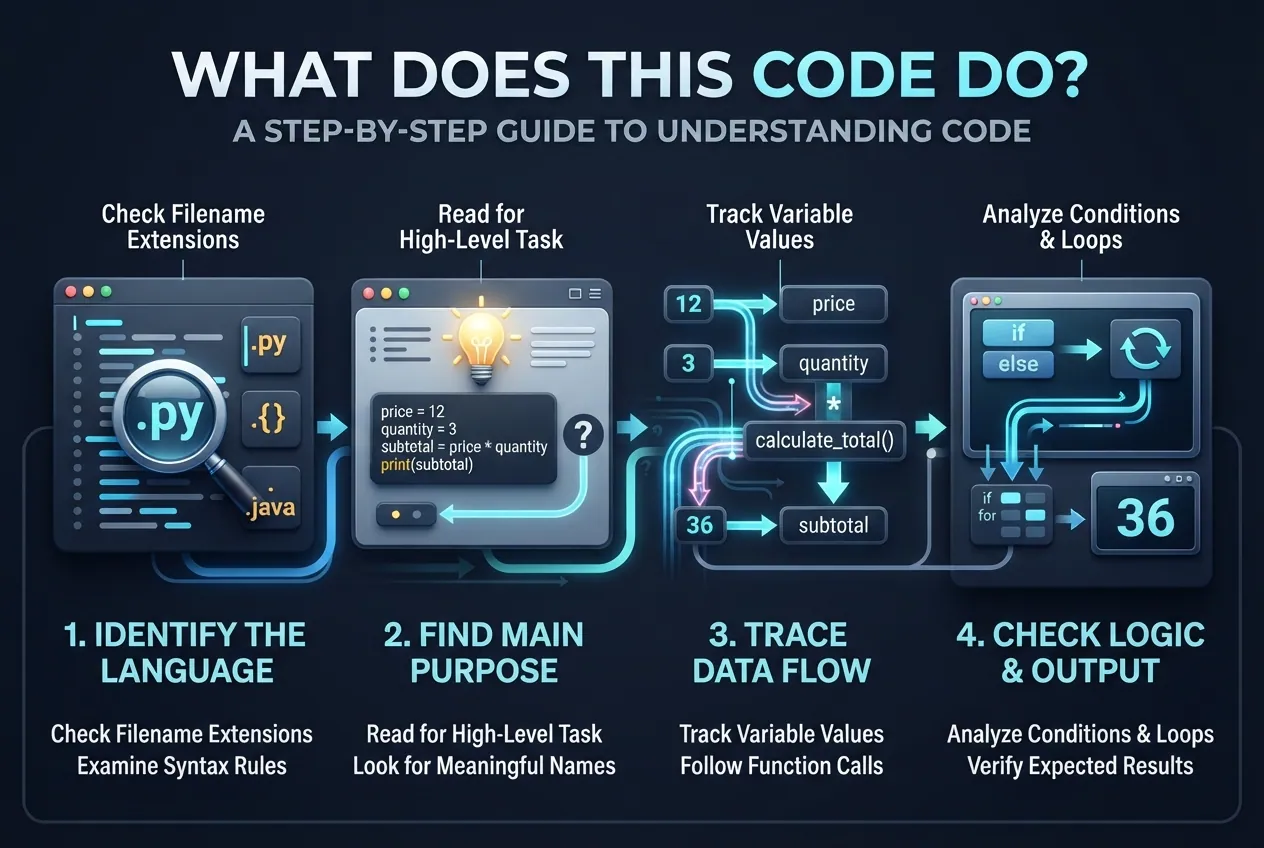
You can use the following process for many common programming languages. The exact syntax and tools will differ, but the main questions remain similar.
1. Identify the Programming Language
Before explaining the code, find out which language it uses.
Common examples include Python, JavaScript, Java, C++, and C#. Each has different rules and syntax. Knowing the language makes it easier to recognize what individual statements mean.
Start with the filename, if available. A .py extension usually indicates Python, while .js usually indicates JavaScript. Files ending in .java commonly contain Java source code.
You can also examine the syntax. For example, Python commonly uses indentation to organize code blocks. JavaScript often uses braces to mark blocks, although its syntax has several variations.
A filename or a few lines might not provide enough evidence to identify a language with certainty. If you’re unsure, ask an AI assistant to identify the likely language and explain which clues support its answer.
2. Find the Code’s Main Purpose
Read the code once without worrying about every technical detail.
Ask yourself:
- What task does this code appear to perform?
- Does it receive information from somewhere?
- Does it calculate something or make a decision?
- Does it communicate with a file, website, database, or another service?
- What result does it appear designed to produce?
Look for meaningful names. A variable named total_price suggests a relationship to a price calculation, while a function named send_email() suggests an email-related operation.
However, names are clues, not proof. A function can have an unclear or misleading name, so examine its actual instructions before deciding what it does.
3. Trace Variables and Functions
Variables store values that other statements can use. Following those values helps you understand how information moves through a program.
Functions group instructions into reusable units. When the code calls a function, you may need to inspect that function’s definition to understand what happens next.
For example, imagine a program passes a number into a function called calculate_total(). To understand the result, check which number enters the function, what calculations occur inside it, and what value it returns.
Also look for imported libraries and external dependencies. These provide code or services that the snippet does not define itself. Without that context, you might not be able to determine its complete behavior.
4. Check Conditions, Loops, Inputs, and Outputs
A condition decides whether certain instructions should run. A loop repeats instructions, sometimes once for every item in a collection.
These structures can change a program’s behavior significantly.
For instance, a condition might display one message when a user is old enough and another when the user is not. A loop might calculate the total of several prices rather than just one.
Then identify the output. Does the program print a message, return a value to another function, update a file, or perform an action elsewhere?
Finally, distinguish the intended result from an observed result. Reading the code can help you predict its behavior, but you may need to run an appropriate test to confirm that prediction.
A Simple Code Example Explained Line by Line
Consider this short Python example:
price = 12quantity = 3subtotal = price * quantityprint(subtotal)
This code calculates the cost of three items priced at 12 units each and displays the subtotal. The example assumes that price and quantity represent the intended amounts. It does not include taxes, discounts, or shipping.
Let’s break down each line.
Line 1: price = 12
This creates a variable named price and assigns it the number 12.
The equals sign assigns a value to the variable. In this context, it does not mean that the program is asking you to solve an algebra problem.
Line 2: quantity = 3
This creates another variable called quantity and assigns it the number 3.
The program now has two values available: a price of 12 and a quantity of 3.
Line 3: subtotal = price * quantity
The asterisk * represents multiplication in Python.
The program multiplies price by quantity, calculating:
12 × 3 = 36
It then stores the result in a new variable named subtotal.
Line 4: print(subtotal)
The print() function displays the value stored in subtotal.
For these inputs, the expected output is:
36
Notice how each line builds on the previous one. The first two statements assign values, the third performs a calculation, and the fourth displays the result.
You could use the same reading method with more advanced code. Identify each input, track changes to variables, follow the statements, and determine how the result is produced.
If this example produced an unexpected value in an actual program, check whether the inputs have the values you expect and whether other statements change them.
How to Ask AI to Explain Code
An AI code explainer can save time when you encounter unfamiliar syntax or a function with many statements. You can use a dedicated code-explainer website or a general-purpose AI assistant that accepts code.
The quality of the explanation often depends on how clearly you describe what you need.
Use a Specific Prompt
Instead of asking only, “What does this code do?”, provide a little more direction.
For example, you can use this prompt:
Explain the following code in beginner-friendly English.
- Identify the programming language.
- Explain the purpose of the code.
- Describe each line in order.
- Explain the variables, functions, and conditions.
- Show the expected output, if it can be determined.
- Identify any missing context or assumptions.
- Point out possible errors without changing the code.
Code:
[Paste a safe, non-sensitive code snippet here]
Replace the placeholder with the code you want to understand. If you know what project the code belongs to, include relevant context that you’re authorized to share.
This prompt asks for more than a short summary. It encourages the assistant to explain the code’s structure, possible output, and limitations.
Ask Follow-Up Questions
You don’t need to understand the whole explanation at once.
Ask focused questions such as:
- What does this function return?
- Why is this condition needed?
- Where does this variable get its value?
- What happens if the input is zero?
- Which part of the code produces this message?
- Does this snippet depend on another file?
You can also request a simpler example of a particular programming concept.
If the explanation introduces unfamiliar terms, ask the assistant to define them in plain English. This makes the tool useful as a learning aid rather than just a source of answers.
Understand the Limitations
AI can misunderstand code, overlook dependencies, or describe behavior that the code does not actually produce. It may also assume that an imported function works in a particular way without having enough information to establish that.
For this reason, don’t treat a detailed explanation as proof of correctness.
Compare the answer with the actual statements, consult the relevant language documentation, and use suitable tests when necessary. Keep the original code unchanged while you’re trying to understand it, so you can separate explanation from modification.
How to Understand Code on GitHub
GitHub hosts software projects containing source files, documentation, and development history. If someone shares a GitHub repository with you, you can often understand its purpose without immediately reading every line.
Start With the README
Look for a file named README.md, usually displayed on the repository’s main page.
According to GitHub’s official README documentation, a README can explain what a project does, why it is useful, how to get started, and where to find help.
Read that information first. It may explain the project’s purpose and identify its main features.
Explore the Relevant Files
Next, find the files related to the feature or function you want to understand.
Look at filenames, folder names, function definitions, and imports. If a function calls another function, check where the second function is defined.
GitHub also displays information about the programming languages found in a repository. This can provide an initial clue about the technologies a project uses, although it doesn’t explain every file’s purpose.
You don’t need to inspect the entire repository if your question concerns one small function. Start with that function and follow only the connections necessary to understand it.
Use GitHub Copilot for Code Changes
GitHub Copilot can help explain selected code and changes in pull requests. GitHub’s official tutorial for exploring pull requests documents ways to request explanations of a pull request, a particular file, or selected lines.
This is especially useful when you want to understand what changed between versions of a project.
The exact workflow depends on the GitHub interface, feature availability, and your account access. You don’t need Copilot to inspect a repository, though. Reading the README, examining the source files, and checking documentation are useful starting points on their own.
Free AI Code Explainers: What Should You Choose?
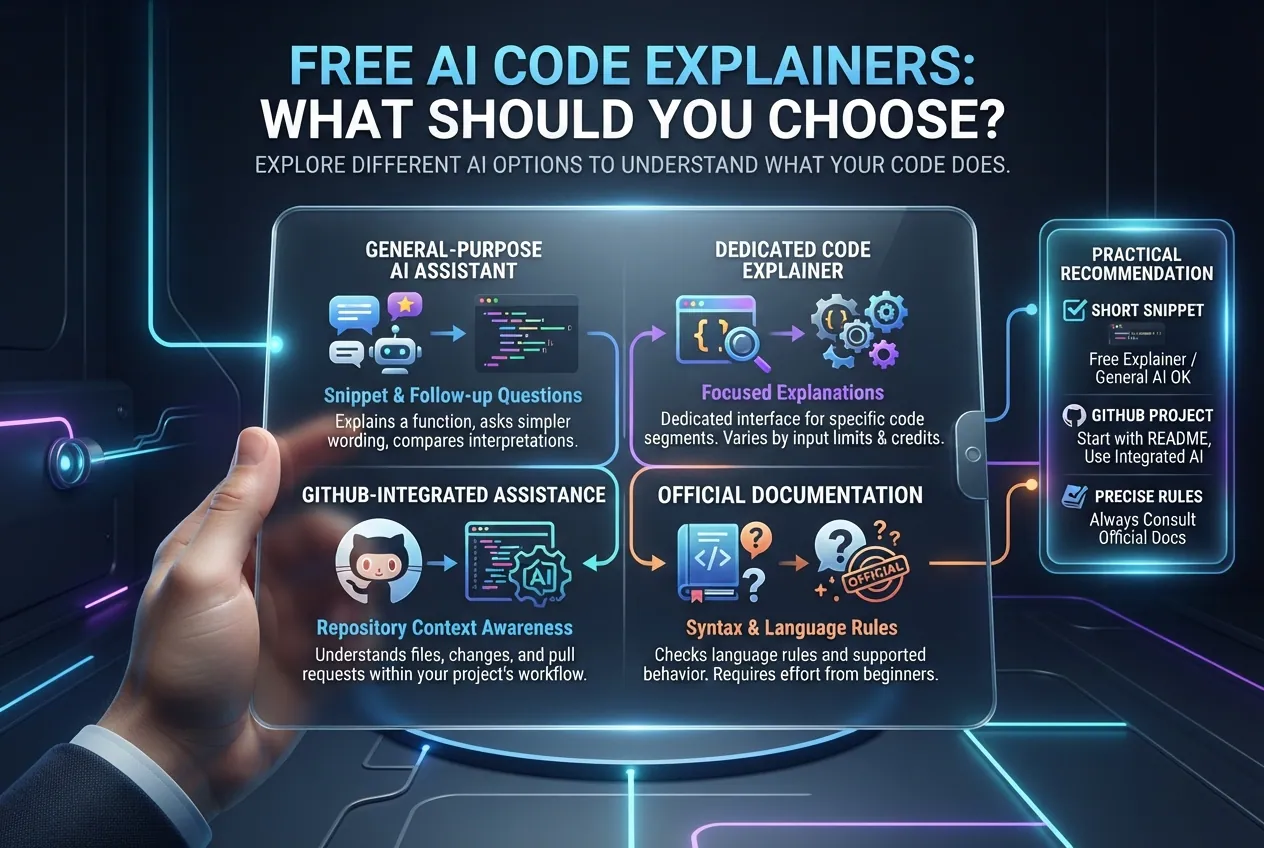
There isn’t one code-explainer tool that’s best for every situation. The right choice depends on how much code you need to understand, whether the tool can use your project’s context, and what you’re comfortable sharing.
| Option | Best suited for | Main consideration |
| General-purpose AI assistant | Explaining a snippet and asking follow-up questions | It may lack the surrounding project context. |
| Dedicated code explainer | Getting a focused explanation through a code-specific interface | Input limits, usage credits, and data handling vary. |
| GitHub-integrated assistance | Understanding repository files and code changes | Some features may require account access or a supported plan. |
| Official documentation | Checking syntax, language rules, and supported behavior | It may require more effort from beginners. |
Option 1: CodeConvert AI
CodeConvert AI offers a dedicated code-explainer tool alongside other coding utilities.
Its official pricing page currently lists a free option that allows up to two conversions per day without an account. A free account provides five additional usage credits, with higher request-size limits. One credit is deducted when a conversion, code generation, or code explanation completes successfully, according to the provider’s pricing information.
The same page lists Pro at $10 per month when billed annually, or $120 per year, and Premium at $20 per month when billed annually, or $240 per year. Applicable sales tax is excluded. These are the provider’s posted prices as reviewed for this article, not guarantees that the same offers will remain available.
A paid plan is not necessary for every beginner. Start with the free option if your code fits its limits and the available features meet your needs.
Option 2: A General-Purpose AI Assistant
Tools such as ChatGPT or Claude can explain code in a conversational format. You can ask what a function does, request simpler wording, or ask the assistant to compare two possible interpretations.
This approach is useful when you want to ask several follow-up questions instead of receiving one explanation.
However, free access, usage limits, accepted inputs, and available features vary by provider and account. Check the official plan information before choosing a tool for regular work.
Option 3: GitHub Copilot
Copilot is worth considering when your code already lives in a supported GitHub workflow. Its pull-request features can provide context about selected lines and changes instead of relying only on a snippet copied into a separate website.
That context may help when a function depends on other files. Still, you should inspect relevant source code and documentation when the answer affects an important decision.
Practical recommendation: For a short, non-sensitive snippet, a free explainer or general AI assistant may be sufficient. For a GitHub project, start with the README and source files, then use integrated assistance where available. For precise language rules, consult official documentation regardless of which AI tool you choose.
How to Check Whether a Code Explanation Is Correct
The most useful habit is to separate an explanation that sounds reasonable from one supported by evidence.
Use these checks before relying on an AI-generated or manually written explanation.
Compare the Explanation With the Code
Check whether the assistant describes the actual variables, conditions, function calls, and return values.
For example, if the answer says that a condition runs only when a value is greater than 10, inspect the operator. A condition using > is different from one using >=, because the latter also includes 10.
Small details like these can change the program’s behavior.
Consult Official Documentation
Use the documentation for the programming language, library, or API involved.
For example, MDN’s JavaScript debugging guide explains how browser developer tools, console messages, and debugging features can help investigate JavaScript behavior.
Documentation is particularly helpful when code uses unfamiliar methods or library functions. If a function belongs to an external package, consult that package’s documentation rather than assuming its behavior from the name alone.
Check the Expected Output
For a simple calculation, work through the values yourself.
For a more complex program, write down the inputs, expected result, and any assumptions about the environment. Compare those expectations with observed output when a safe, appropriate test is possible.
A useful test checks a normal input and, where relevant, an unusual input. For example, if a function divides two numbers, consider whether it handles a zero denominator appropriately.
Read Error Messages Carefully
A program that fails to run may have a syntax error, missing dependency, configuration problem, or logic error.
Don’t immediately replace the code with an AI-generated version. First, read the error message and identify the affected file or line. Then inspect the relevant code and use official troubleshooting guidance.
The exact debugging interface depends on the language and environment, so follow the instructions for your particular tools.
Know When the Answer Is Incomplete
A snippet may depend on configuration files, environment variables, imported modules, a database, or an external API. Without those details, the assistant may be unable to determine the complete behavior.
In that situation, a reliable explanation should state what can be inferred and what remains unknown.
If the missing context is important, locate the relevant source file or documentation before drawing a conclusion.
How to Stay Safe When Explaining or Running Code
Understanding code and executing code are different activities. You can often inspect a snippet without running it, but execution may allow it to access files, communicate over a network, or change data, depending on its permissions and environment.
Take these precautions when using an online code explainer or examining an unfamiliar project.
- Remove sensitive information. Don’t paste passwords, API keys, access tokens, customer records, or private source code into a service unless you have confirmed that its use is authorized and consistent with your organization’s policies.
- Check data-handling settings. Review the provider’s current privacy policy, retention rules, and training controls. For example, OpenAI’s ChatGPT data-controls guidance explains how eligible users can turn off model improvement for new conversations. Turning that setting off does not automatically delete chats from history.
- Don’t run unknown code blindly. Review its purpose and potential effects first. When testing untrusted code is necessary, use an appropriately isolated environment and avoid granting unnecessary access to personal files, accounts, or systems.
- Keep important data protected. Before testing code that changes files or records, understand which data may be affected and ensure that suitable backups and recovery options exist.
For work involving production systems, sensitive information, or security-critical operations, get appropriate technical review when you cannot establish what the code does or whether it is safe.
Common Mistakes to Avoid When Reading Code
Trusting the AI answer without checking it: A confident answer can still be incorrect. Compare important claims with the source code and relevant documentation.
Trying to understand a whole project at once: Large repositories contain many files and dependencies. Start with the specific function or feature related to your question, then follow its connections as needed.
Ignoring inputs and conditions: The same function can behave differently depending on its input values and the conditions it encounters. Track those details before deciding what the result should be.
Confusing comments with actual behavior: Comments describe the author’s intended meaning, but they can become outdated. Always compare a comment with the instructions that follow it.
Running code before reviewing it: Even a short snippet can contain file operations, network requests, or other actions. Understand its purpose and likely effects before executing it.
A steady, evidence-based approach helps you learn more than simply collecting an answer from an AI tool.
Frequently Asked Questions
What does this code mean in AI?
It means asking an AI assistant to explain the purpose, logic, and behavior of a programming snippet in plain language. You can request a line-by-line explanation, identify the inputs and outputs, and ask it to flag assumptions or missing context.
What does this code do on GitHub?
Open the repository, read its README, and inspect the relevant source files. Follow function calls and dependencies when needed. GitHub Copilot may also help explain selected code or pull-request changes when the relevant features are available.
How can I explain code line by line online?
Paste a non-sensitive snippet into a suitable AI code explainer and ask for each statement’s purpose, its effect on variables, and the expected output. Then compare the result with official documentation and the actual code.
How do I identify a programming language?
Check the filename extension and look for recognizable syntax. Extensions such as .py and .js commonly indicate Python and JavaScript, respectively. When the evidence is unclear, ask a code assistant to identify the likely language and explain its reasoning.
Is there a free AI code explainer?
Yes. CodeConvert AI offers a free code-explainer option, and general-purpose AI assistants may also provide free access subject to their current limits. Check usage allowances, request-size restrictions, account requirements, and privacy terms before submitting code.
Your Next Step to Understanding Code
Start with a short snippet rather than an entire project. Identify its language, follow the variables and functions, and work out what output you expect.
When you need help, ask an AI tool to explain the code in plain English. Then compare that explanation with the source and relevant documentation.
The goal isn’t simply to get an answer to “what does this code do?” It’s to understand why the code behaves that way and how you can check the explanation yourself.
Disclaimer
This guide provides general information; code behavior can vary by programming language, runtime, dependencies, device, and configuration. Check current tool terms and privacy settings before sharing code, and seek qualified technical help for sensitive systems or code that could affect important data.